Create Email API Project & Setup Configuration
Set up an Email API project to send transactional and campaign emails reliably. Configure sending limits, pricing plans, and delivery modes for scalable email operations.
Project Setup
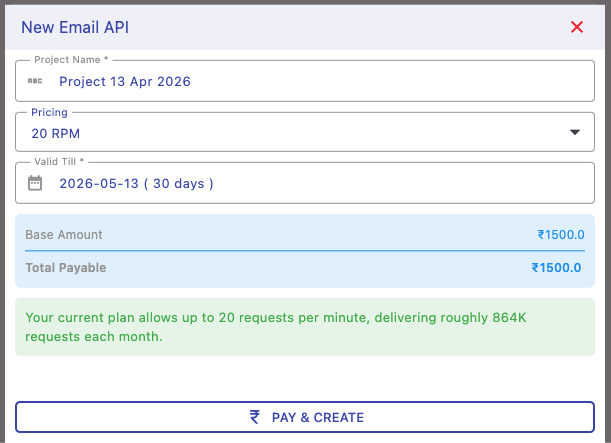
Create your email project by assigning a name, selecting a pricing plan, and setting validity duration. This defines how long your email service remains active.
You can also configure your sending mode (platform email or custom domain) after project creation.
Pricing & Rate Limits
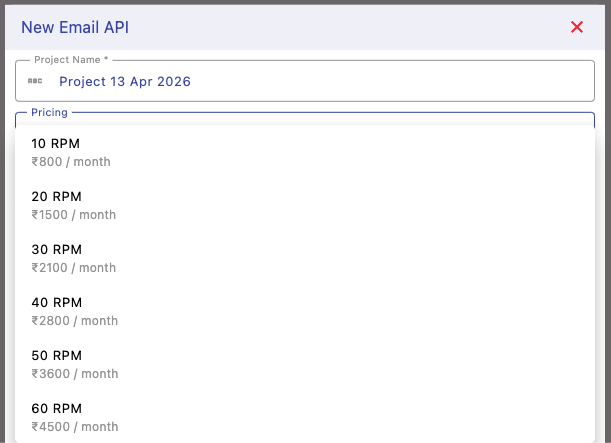
Choose a plan based on your required emails per minute (RPM). Higher RPM allows faster email processing and higher throughput for bulk or high-frequency sending.
For example, a 30 RPM plan allows up to 30 emails per minute (~1.2M emails/month), suitable for moderate workloads.
Project Details & Sending Mode
After creation, view your project details including current plan, validity, and sending configuration.
You can choose between platform email (quick setup) or your own domain (recommended for branding and better deliverability).

Next Steps
Start using and managing your email API: