Business Link Analytics & Click Tracking
Analyze performance of your business links with detailed insights across countries, devices, platforms, and more.
📊 Use stats to understand user behavior, optimize campaigns, and improve conversions.
Step 1
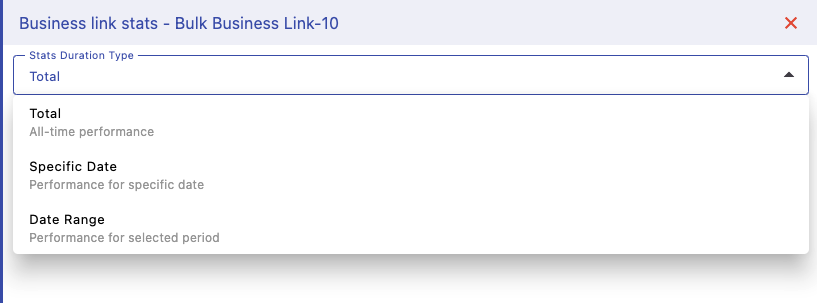
Select Duration
Choose how you want to view data — total lifetime stats, a specific date, or a custom date range. This helps you analyze both long-term trends and short-term campaign performance.
Step 2
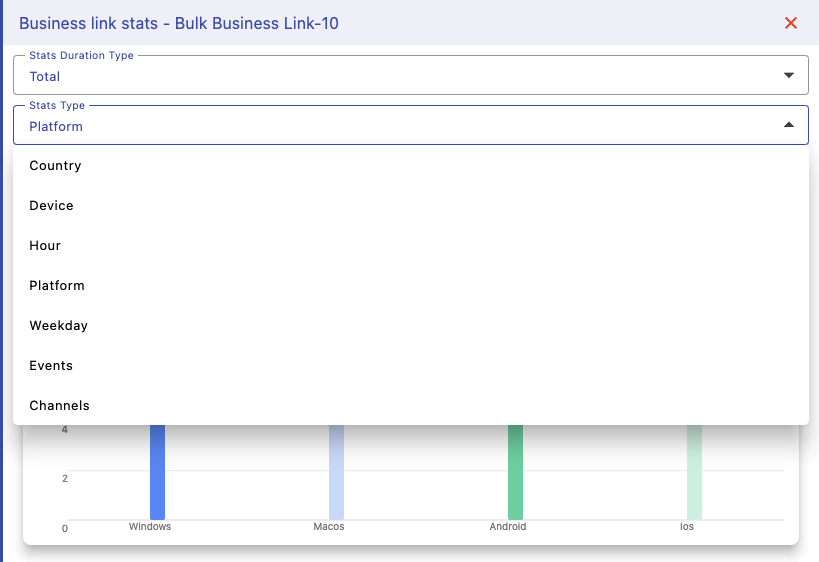
Select Stats Type
Filter analytics based on different dimensions like country, device, platform, hour, weekday, events, or channels. This allows you to break down traffic and understand where your users are coming from.
Step 3
Visualize Data
View your data in easy-to-understand charts. Each bar represents performance for a selected category, helping you quickly identify trends, high-performing regions, and user patterns.

Available Metrics
You can analyze multiple dimensions of your traffic:
- 🌍 Country-wise performance
- 💻 Device breakdown (desktop, mobile, tablet)
- 📱 Platform insights (Windows, Android, iOS, etc.)
- ⏰ Hourly & weekday trends
- 📊 Events like visits and conversions
- 📣 Channel tracking performance
Use these insights to optimize targeting, improve engagement, and maximize ROI from your business links.